Xcode 27 May End the Golden Era for Backward-Compatible Apple Apps
Xcode 27 turns old deployment targets into build errors. A hidden workaround still works, but Apple may be moving backward compatibility from a developer choice to a platform rule.
Apple has spent years giving developers something unusually valuable. We could build an app with a modern SDK, use current APIs where they were available, and still let the same binary run on much older operating systems.
That did not mean every developer had to support old devices. It meant the developer could decide.
Xcode 27 beta may be the beginning of the end of that choice.
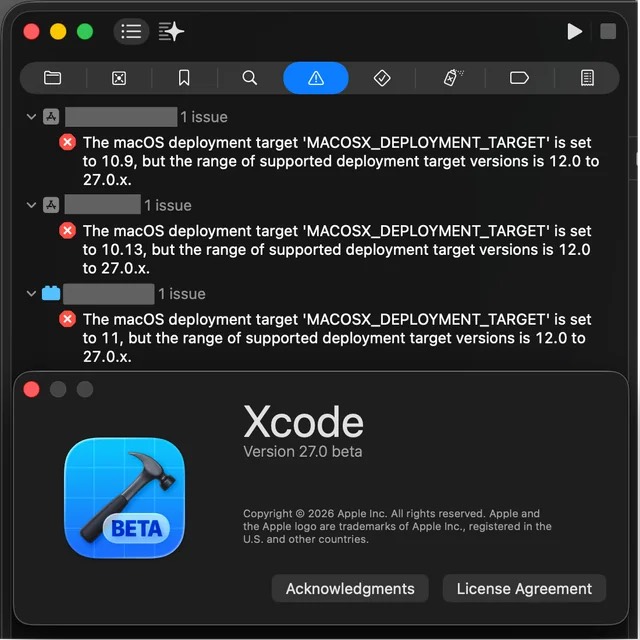
When I opened my Mac projects in Xcode 27, apps that compiled successfully in Xcode 26 stopped building. Deployment targets that had previously produced warnings were now errors. Xcode said that macOS 12 was the new minimum. The same experiment on iOS produced a minimum of iOS 15.
At first, this looked like a hard technical cutoff. I thought I would have to remain on an older Xcode, split my releases into modern and legacy builds, or drop older systems entirely.
I eventually found a hidden workaround that changes the errors back into warnings. That is good news, but it does not make the concern disappear. The setting is undocumented, absent from the normal Xcode interface, and currently being tested only in a beta toolchain. The larger question is what Apple intends to enforce when Xcode 27 is final and, later, when App Store submission requirements move to its SDKs.
The deployment target used to be a real choice
There are three different ideas that are easy to confuse when discussing Xcode compatibility.
The SDK determines which platform APIs an app can compile against. The deployment target declares the oldest operating system on which the finished app is intended to run. Xcode’s published support table describes the versions that Apple officially supports for deployment, testing, simulators, and connected devices.
Those numbers have not always been the same as a hard compiler boundary.
Apple’s current Xcode system requirements list Xcode 26 with deployment targets beginning at iOS 15 and macOS 11. Yet developers have been able to enter older targets manually. In an Apple Developer Forums discussion about Xcode 26, an Apple product manager explained that the published deployment target range is aligned with simulator support and on-device debugging. The accepted answer confirms that an iOS 13 target can still build even though it falls below the range in Apple’s table.
My own tests went further. Xcode 26.5 compiled a project targeting iOS 9.0. It warned that the target was older than the supported range, but the build succeeded. On macOS, I have compiled current apps with deployment targets as old as macOS 10.9. Xcode warned me, but it still produced working applications.
This difference was important. Apple’s website communicated the range Apple actively supported. The compiler still allowed an experienced developer to go lower and accept responsibility for testing the result.
The arrangement created an unusually long compatibility window. VLC media player on the App Store is still actively maintained and still declares support for iOS 9.0 and later. I have also released my own modern Mac apps with macOS 10.9 support, and Apple approved them for the Mac App Store.
None of this required building against a decade-old SDK. The useful combination was a current SDK with an old deployment target. New systems received modern behavior, while availability checks protected code paths that did not exist on older systems.
The App Store rules are not the same for iOS and macOS
Apple’s upload policy adds another layer to the story.
Since April 28, 2026, Apple has required App Store Connect uploads for iOS, iPadOS, tvOS, visionOS, and watchOS to use Xcode 26 or later and the corresponding version 26 SDK. An iOS developer therefore cannot simply remain on an old toolchain forever and continue publishing normal App Store updates.
Until Xcode 27, that requirement did not necessarily end support for old operating systems. A developer could use the required modern SDK, choose a much older deployment target, accept Xcode’s warning, and submit one app that served both old and new devices.
The current Apple requirement does not list macOS. That distinction matters. Mac developers can still submit builds made with older Xcode versions, subject to App Store validation, signing, and other requirements. My concern for the Mac App Store is therefore conditional. It becomes a hard store problem if Apple later requires Xcode 27 for Mac uploads or begins validating the new deployment floor during submission.
For iOS and iPadOS, the path is more predictable. Apple has consistently advanced the required SDK and Xcode version for App Store submissions. Developers will not be able to remain on Xcode 26 indefinitely. When Apple moves the upload requirement to Xcode 27 or the iOS 27 and iPadOS 27 SDKs, the remaining question will be whether the hidden setting still works and whether App Store Connect accepts builds made with older deployment targets. If either answer is no, apps targeting iOS or iPadOS 14 and earlier will no longer receive newly submitted compatible builds.
The timing may not match the operating system release day, but the platform difference is clear. Mac developers will likely remain able to submit with an older Xcode unless Apple changes its current policy. iOS and iPadOS developers will eventually have to adopt the newly required toolchain. For them, the unknown is not whether Apple will keep advancing its SDK requirement. It is whether any supported path to older deployment targets remains when that happens.
Why Objective-C made long support practical
Whenever I mention Objective-C, someone asks why I am not using Swift.
Objective-C is not deprecated. Apple still documents the Objective-C runtime, and the AppKit and Foundation APIs I need for my Mac utilities remain available from Objective-C. It also integrates naturally with my existing C++ code.
That does not mean every new Apple technology is equally accessible from Objective-C. Some newer frameworks and programming models are Swift-first or Swift-only. SwiftUI and SwiftData are obvious examples. For a traditional AppKit utility, however, Objective-C can still use the modern system APIs that matter to the product.
Its dynamic runtime also makes compatibility straightforward for this kind of application. I can check whether a class, selector, or operating system feature is available and choose the right path at runtime. Apple explicitly documents availability checks for both languages and recommends maintaining one app across multiple operating system versions when practical in its guide to running code on a specific OS version.
In my apps, macOS 10.9 compatibility required only a small number of exceptions. Those checks live in a shared Objective-C library that I reuse across projects. Users on current macOS versions lose no features or quality because an older branch exists for a few operations.
Swift needs a more careful explanation than the common claim that every new Swift release forces developers to drop another macOS version. That is not literally true. Swift 5 introduced ABI stability, and the Swift project explained that Swift 5 itself did not require apps to raise their minimum deployment target. Language modes are primarily a source compatibility choice.
The practical difference appears when an app adopts features that depend on a newer Swift runtime, standard library behavior, or a newer Swift-only framework. Some features can be back deployed and others cannot. A developer who wants the latest SwiftUI or platform features may therefore raise the minimum OS more often, while an AppKit application using Objective-C’s mature runtime can sometimes keep an old target with very little work.
So this is not an argument that Objective-C is universally better than Swift. It is an explanation of why long compatibility has been inexpensive for my applications. If supporting old systems required a separate architecture, a large test matrix, and constant compromises for modern users, I would make a different decision.
Xcode 27 changed a warning into a wall
Then I installed Xcode 27 beta.
The projects themselves had not changed. They remained compatible with macOS 27, and their existing binaries continued to run. The failure appeared at build time.
For a project targeting macOS 10.9, Xcode reported the following error.
The macOS deployment target ‘MACOSX_DEPLOYMENT_TARGET’ is set to 10.9, but the range of supported deployment target versions is 12.0 to 27.0.x.
Projects targeting macOS 10.13 and macOS 11 failed the same way. On iOS, a project targeting iOS 9.0 failed because Xcode 27 declared iOS 15.0 to be the supported range.
Apple’s Xcode 27 system requirements now show macOS 12 through 27 and iOS 15 through 27 as deployment targets. The important change was not merely the published table. Xcode 26 had also published a newer range while allowing developers to build below it. Xcode 27 turned the difference into an error.
My first conclusion was bleak. Keeping old systems would mean freezing the release toolchain, keeping multiple Xcode installations, or maintaining separate modern and legacy builds. Each path adds work.
Separate builds require separate testing and release pipelines. Outside the Mac App Store, they may also require a developer to manage updates, downloads, licensing, payments, and customer support. Inside the store, a developer might eventually have to choose between leaving the existing app on a legacy toolchain or raising its minimum system version for every future update.
Most developers will not build that machinery for a small percentage of users. They will raise the target and move on. That is why a toolchain default can change the ecosystem even before Apple introduces an explicit App Store rule.
Why this cutoff feels different
Apple has ended major compatibility eras before, but the most visible changes usually came with a clear technical boundary.
iOS 11 stopped running 32-bit apps after the App Store had already moved developers toward 64-bit builds. Apple explained that 32-bit apps would no longer launch on iOS 11. On the Mac, Apple announced that Mojave would be the final release for 32-bit apps, and macOS Catalina removed 32-bit app compatibility.
Those transitions required applications to move to a different processor architecture.
The Xcode 27 deployment error does not currently show the same kind of technical necessity. Existing binaries still run. Xcode 26 still creates valid applications for older systems. Apple even says in the Xcode 27 release notes that the macOS SDK remains Universal and that Intel development is still possible for macOS versions with Rosetta.
Apple may have good reasons to reduce the combinations it officially supports. Old systems no longer receive full security updates. Simulator and device testing resources have a cost. Removing legacy pieces can simplify Xcode and its SDKs. None of that proves that an otherwise compatible application must be prevented from building for an older target.
That is what makes this change feel less like an unavoidable architecture transition and more like a policy direction. The compiler can still do the work.
The hidden workaround
After more testing, I found that Xcode 27’s new error can currently be disabled with this build setting.
__DIAGNOSE_INVALID_DEPLOYMENT_TARGET_AS_ERROR = NOWith that setting, my old deployment targets compile again. Xcode returns to the previous behavior and reports warnings instead of stopping the build.
This discovery changes the immediate conclusion. Xcode 27 beta does not contain a hard technical cutoff today. The compiler and SDK can still produce the older targets I tested.
It also creates a new concern.
The setting is not documented on Apple’s Xcode support page. It is not offered as a normal switch in the Xcode interface. A developer who opens a project, sees the red deployment target error, and follows Xcode’s guidance will probably raise the target without knowing another option exists.
Developers discussing my original macOS investigation on Reddit and the follow-up iOS investigation raised the same question I now have. Will this internal escape hatch survive the final Xcode 27 release, and will App Store Connect accept the resulting binaries when its requirements advance?
There is no official answer yet.
What happens if the escape hatch disappears
If Apple removes the setting or enforces the documented floors during submission, the impact will be larger than the number of people currently running one old operating system.
For iOS developers, a future Xcode 27 or iOS 27 SDK requirement would make the cutoff especially difficult to avoid. Normal users cannot install an iPhone app from any developer website in the same universal way Mac users can. Alternative distribution exists only under limited regional and program conditions, and it does not replace the App Store for most users.
An app that raises its deployment target will not suddenly disappear from an old phone. Existing installations can continue working, and the App Store may continue offering an older compatible release. The important loss is forward movement. Those users stop receiving the app’s new features, compatibility work, and bug fixes even when the developer would have been willing to include them.
Mac developers have another route. Apple supports Developer ID distribution outside the Mac App Store, so an older Xcode can remain part of a separate legacy release pipeline. But that means the developer becomes responsible for hosting, updates, payment systems, licensing, and more of the support burden. Some Mac developers also depend on App Store services or simply do not want to operate a second distribution channel.
The likely result is not that every old app dies at once. It is a rapid reduction in the already small group of maintained applications that still run on older systems.
Today, a developer can look at the cost of compatibility and decide whether it is worthwhile. If the app needs only a few availability checks, support can continue. If it demands major compromises, the developer can raise the target. Removing the workaround replaces that product decision with a toolchain rule.
The real turning point
macOS 27 Golden Gate and Xcode 27 are expected to leave beta during the same release cycle this fall. What happens next will be different on the Mac and on iPhone and iPad.
For macOS, Apple will likely continue accepting apps built with older Xcode versions. A developer determined to preserve compatibility may therefore keep Xcode 26 installed or maintain a separate legacy build. Xcode 27 will still push many developers toward macOS 12 because that is the default error they will see, but it becomes a hard Mac App Store cutoff only if Apple also requires Xcode 27 or validates the same deployment floor during submission.
For iOS and iPadOS, staying on Xcode 26 is not a lasting option. Apple has repeatedly made a current Xcode and SDK mandatory for new App Store submissions. Once that requirement advances to Xcode 27, the future of legacy support depends on three things.
- Xcode 27 must keep the hidden warning-only setting
- The setting must continue allowing older deployment targets in release builds
- App Store Connect must accept those builds
If any one of those conditions fails, iOS and iPadOS developers will have no normal App Store path for publishing new updates that still support versions older than 15.
I am not asking Apple to support macOS 10.9 or iOS 9 forever. I am asking it to preserve a choice that has worked remarkably well. When a modern application can support an old system without reducing the experience for anyone else, the compiler should not stop it without a concrete technical reason.
For years, Apple gave developers a rare balance between moving the platform forward and keeping useful hardware alive. Xcode 27 beta suggests that balance may be changing.
If the workaround survives and Apple continues accepting those builds, the golden era is not over yet.
If it does not, iOS and iPadOS developers will reach a hard cutoff when Xcode 27 becomes mandatory for App Store submissions. On the Mac, the change will be more gradual as long as Apple accepts older Xcode builds, but Xcode 27’s default behavior will still persuade many developers to drop legacy support.
That would make the Xcode 27 generation the point when backward compatibility began moving away from a developer’s decision and toward an enforced platform rule.