My Mac Apps Story, Part 3 - Apps That Shaped My Workflow and Developer Interviews
Find Any File, PCalc, Blackmagic Disk Speed Test, and iStat Menus, plus exclusive interviews about keeping Mac apps alive for decades.
Part 2 ended in the middle of my story with the 2014 13-inch MacBook Pro. This is where Part 3 continues.
Compared with my 2008 MacBook, the 2014 MacBook Pro felt much thinner. I noticed the difference most in its display lid.
I was used to working with a MacBook on my knees, sometimes while keeping it connected to the charger. It still used MagSafe, but the thinner MagSafe 2 connector came loose by accident much more often. The original MagSafe connector on my 2008 MacBook felt much more stable to me.
That MacBook served me extremely well. More importantly, the apps I was finding were helping me build a macOS workflow that felt like mine.
Finding Files Without Spotlight
Years ago, when I used Windows XP, I was satisfied with its slow file search because it searched file names. I never needed the search engine to read the contents of every file.
Later, I used Everything on Windows. It did the simple job I wanted, but almost instantly.
My needs did not change when later versions of Windows introduced indexed search. A large part of my drive contained source code, and I did not want Windows indexing the contents of all those files. When I disabled indexing, it simply fell back to a plain file name search in the current folder. That was perfectly fine for me.
Spotlight brought the same kind of indexing to macOS, along with CPU activity for work I never asked it to do. I eventually disabled file indexing and kept using Spotlight mainly to launch apps.
I expected Finder to do what Windows did and fall back to a plain file name search in the current folder. Instead, with indexing disabled, Finder simply tells me that no files were found, even when I search a folder containing only a few files. The same thing happens while indexing is still in progress. I was surprised then, and I still am. I cannot understand Apple's decision to leave Finder search broken this way.
Spotlight also sometimes keeps a USB drive or SD card busy while indexing it and prevents me from ejecting it when I want to. This is especially annoying because I never asked it to index those drives.
In 2015, I found Find Any File. It became my only graphical replacement for the system file search. It searches directly by file name without requiring a content index and returns results quickly. It can search file contents when requested, but that is not how I use it.
The interface looks simple, but the app has much more inside, including hidden preferences for advanced needs.
When I contacted the developer in 2015, he explained that Find Any File could search the HFS catalog directly, much as Everything reads the NTFS Master File Table on Windows. It could even do this with some AFP network volumes backed by HFS.
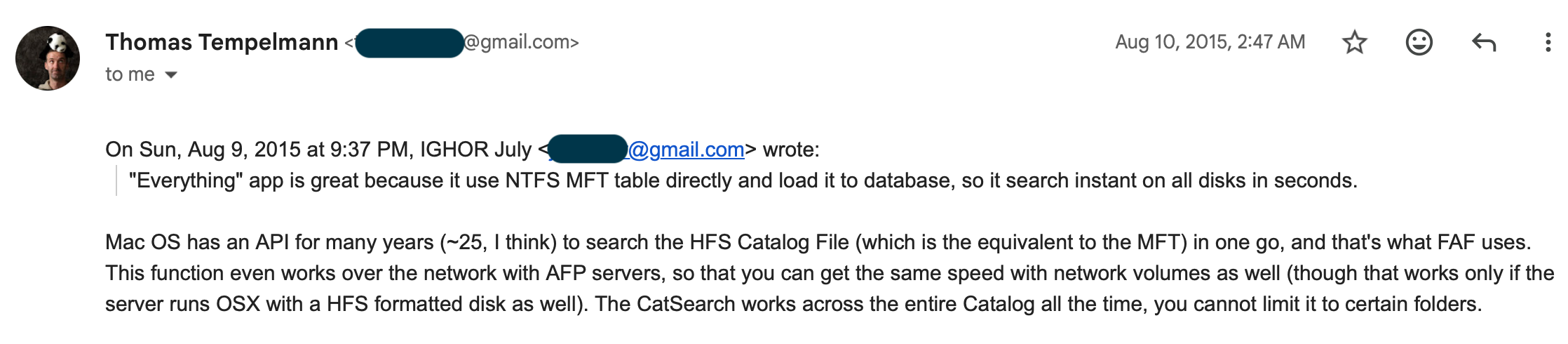
That email helped me understand why the app felt so different from Spotlight.
Find Any File is another rare app whose current Mac App Store binary I tested locally and confirmed to be unsandboxed. As I explained in Part 2, Apple requires new Mac App Store apps to use App Sandbox, while some older apps that were already in the store were allowed to preserve their existing architecture. That makes long-maintained apps like this especially difficult to replace inside the store.
I bought Find Any File more than ten years ago. It is still updated, no one has forced me to pay again, and I still cannot remember finding a single bug in it. That combination is rare.
The Calculator I Could Make My Own
As a student, I used many different calculators. PCalc became my favorite. I first used it on my iPhone 3GS and later bought the Mac version.
What made it different for me was its customizable interface. I liked that the calculator was resizable and that I could customize every button, letting me shape it around the way I worked instead of adapting to a fixed layout.
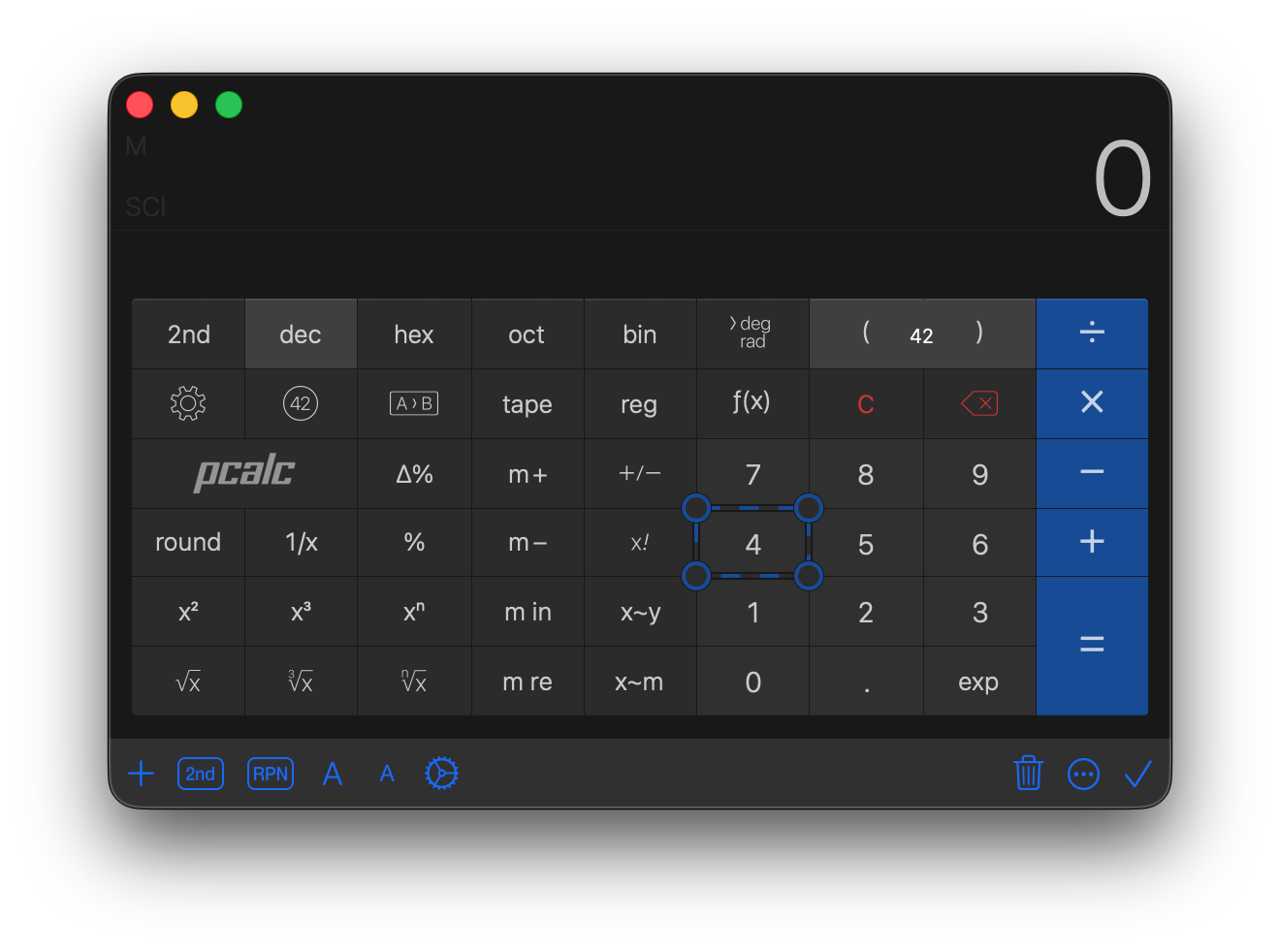
PCalc began in 1992, long before I found it. It is still maintained and still feels like the same focused app I liked from the beginning.
Learning How Much Memory I Actually Used
I like finding unusual and useful apps, then trying them to see whether they improve my workflow. iStat Menus is one of the apps I kept.
When I first tried it, I wanted to add some useful information to the menu bar. I ended up keeping it for a completely different reason. Today, my menu bar is minimal, and iStat Menus adds only one icon showing the charge levels of my batteries.
What made me appreciate the app even more was its ability to keep a history of my MacBook usage. I can review my memory use over the previous 30 days instead of judging it from a single moment in Activity Monitor. This shows me how I actually use my MacBook's RAM over time and how much I really need.
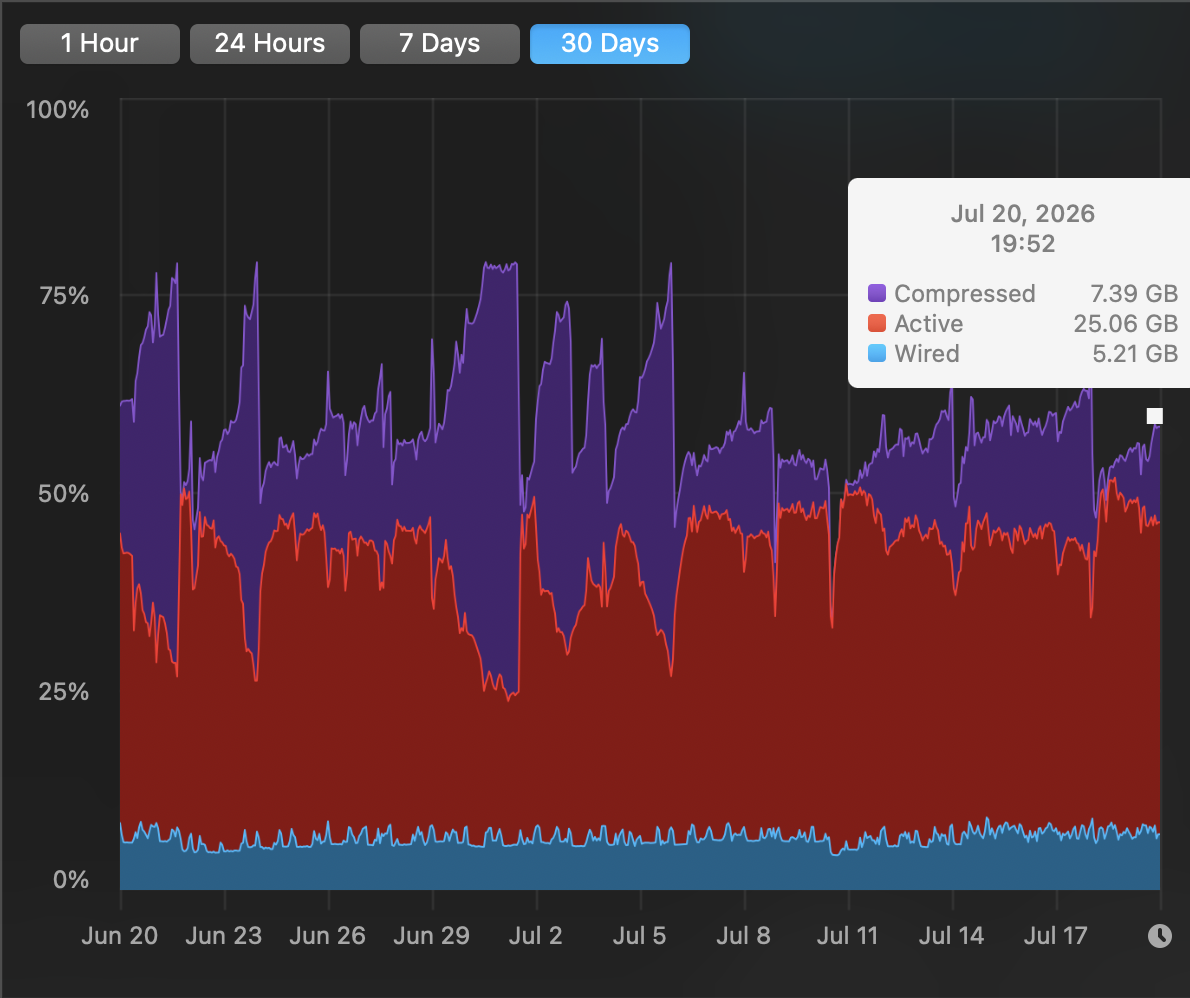
That history helped me understand how much RAM would be enough for me when I upgrade to a new MacBook. It gave me a practical answer instead of a guess.
The version I bought was later followed by another paid major version. I still recommend supporting it. Sometimes we need developers to keep pushing updates, but sometimes they need us to support their work.
Seeing How Fast My Drives Really Were
Blackmagic Disk Speed Test was one of my favorite benchmark tools. I remember seeing this app everywhere, in YouTube videos and screenshots across the web. It still appears in those places after so many years. Its two large read and write gauges have become iconic, and I believe many of you will recognize the interface immediately.
The simple interface delivered exactly the information I wanted to know. I liked using it to compare the speed of my MacBook's drive with the drive in my Windows PC. The app also let me choose the test file location, so I could point it to a microSD card or external drive and find out its actual read and write speeds.
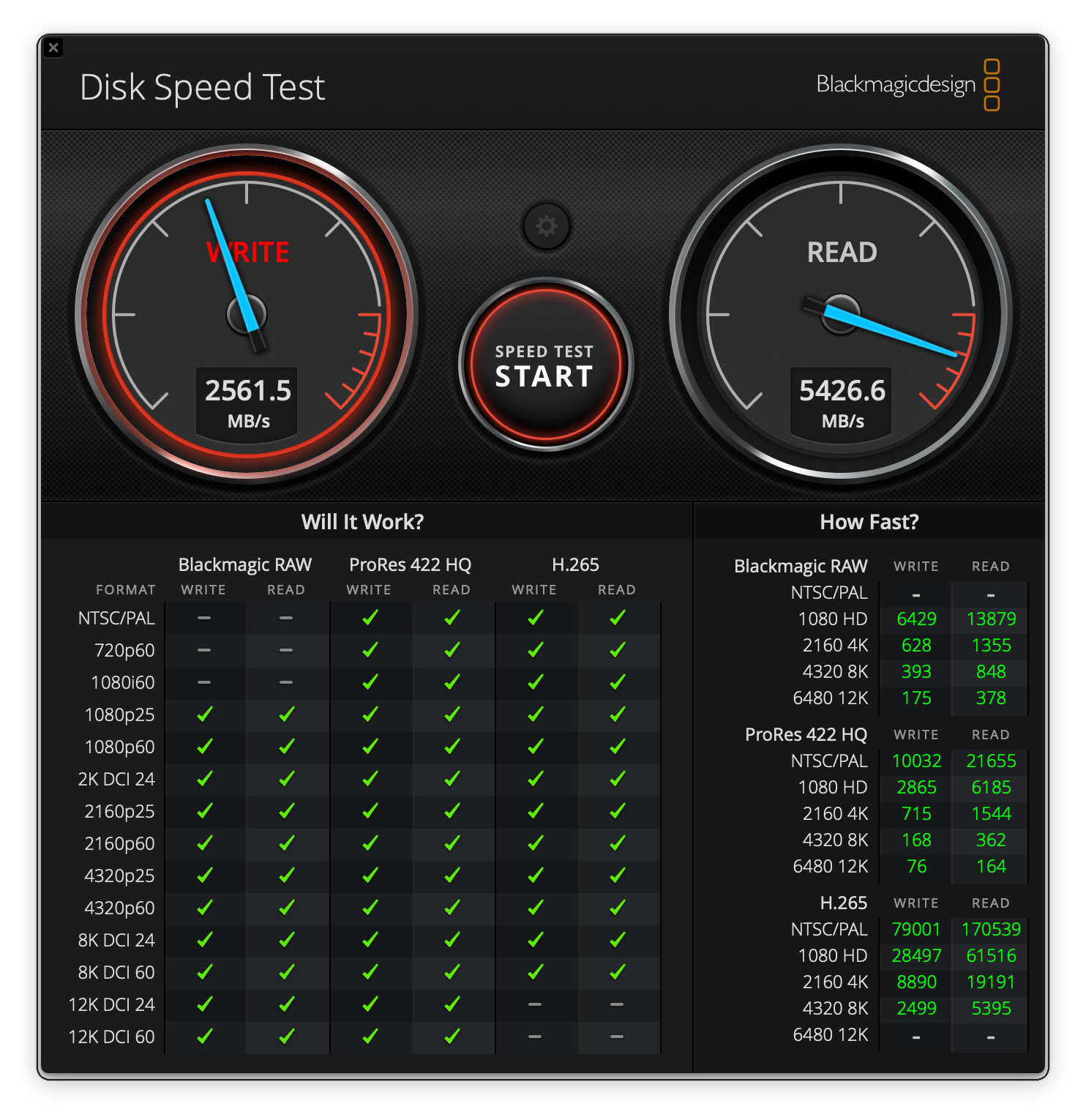
A standalone version arrived on the Mac App Store in 2011, and Blackmagic Design continues to update it.
Three More Mac Developer Interviews
These interviews are exclusive to my Reverse Everything blog. I hope other developers, especially new ones, find them useful.
Find Any File — An Interview with Thomas Tempelmann
Ighor July
What motivates you to continue developing and supporting Find Any File after so many years?
Thomas Tempelmann
Find Any File provides a side income that I rely on. I also enjoy getting feedback for my work, which is why I make my products personal instead of hiding anonymously behind a company name.
I also earn a little from another app, iClip, although its popularity has declined because there are many competitors. On the other hand, Find Any File has become popular enough to maintain a good reputation without advertising, which is not one of my strengths.
I have tried to create other apps that would earn money, but none of them has worked out so far. I keep trying, though.
Ighor July
What advice would you give to independent developers who hope to maintain and support their apps for ten years or longer?
Thomas Tempelmann
Keep your users happy. Even if they ask for features you do not want to implement or cannot implement, show that you understand what they want and politely explain why you cannot fulfill the request, even if the reason is simply that you do not have enough time or the effort would not be worthwhile.
When possible, add small things, even if you would not find them useful yourself. Users will tell others and praise your effort and reliability. That is how I still have a near-perfect five-star rating on the Mac App Store.
Read the complete Find Any File interview.
PCalc — An Interview with James Thomson
Ighor July
What motivates you to continue developing and supporting PCalc after so many years?
James Thomson
Stubbornness, mainly :) Really, it's still a good app to keep up with the changes each year, and keep learning. But, I want to keep it going. It's been 34 years, so I don't feel I can really stop now! Maybe when I get to 42 years. Plus, it has provided a good income, and it's nice to be able to pay the bills.
Ighor July
What advice would you give to independent developers who hope to maintain and support their apps for ten years or longer?
James Thomson
The easiest thing is to make something because you actually want to use the app yourself. Don't just make something because you think it will make money. If your heart is not in it, you will get bored of it easily!
Read the complete PCalc interview.
iStat Menus — An Interview with Bjango
Ighor July
What motivates you to continue developing and supporting iStat Menus after so many years?
Marc
That’s a great question. It’s a joy to work on a tool that we use ourselves, and it always brings a smile to my face when I see it in someone’s menu bar. It’s even been in TV shows before!
Ighor July
What advice would you give to independent developers who hope to maintain and support their apps for ten years or longer?
Marc
Honestly, it comes down to people liking your app enough that they’ll use and recommend it. The challenge often isn’t technical. It’s about building up trust and respect.
I also feel like getting noticed is harder now than it used to be. There’s a good chance luck and timing played a big role in how things turned out for us.
Read the complete iStat Menus interview.
In Part 4, I continue with four more apps that made macOS work the way I wanted and three more interviews with their developers.