My Mac Apps Story, Part 6 - What I Gave Up for a Smaller MacBook
I traded my usual search for more power for six months with a 12-inch MacBook. With exclusive interviews about ForkLift, DaisyDisk, and LaunchControl.
My 2017 Touch Bar MacBook Pro from Part 5 served me well for years. I followed every new MacBook release, but a little more speed or another hour of battery life wouldn't change what I did with it. If I was going to replace a MacBook I liked, I wanted to try something I couldn't do with the one I had.
I'd always bought as much CPU power, GPU power, and RAM as I could afford. What I didn't know was how much of it I actually needed. The MacBook that finally interested me was less powerful than the one I already owned.
A MacBook I Could Pick Up with Two Fingers
It was the 12-inch Retina MacBook from 2017, model A1534. At 0.92 kg, it was light enough to carry with two fingers. Apple had even built the battery in layers to fit the tapered case. That interested me more than another benchmark. I wanted to know what it was like to work on something that small every day.
It reminded me of something I'd noticed about carrying my first MacBook. At university, I'd take my Windows laptop out of my backpack, open the lid, and often find dust on the keyboard. It had worked its way through the gap even though the lid was closed. My first MacBook had a thin rubber rim around the display that sat snugly against the body. Until then, I'd never given much thought to how a laptop lid closed.
I moved everything over from my Time Machine backup, just as I had on previous Macs. Once I started typing, I didn't feel as though I'd given up much. The case was smaller than my Pro, but the keyboard was still full size. The trackpad felt just as responsive, and the Retina display looked as good to me as the one I'd left behind.
Mine had 8 GB of RAM, a single USB-C port, and no fan. After about six months, I knew which compromise bothered me. It wasn't the port. Even with only 8 GB, the SSD was fast enough that swapping memory to disk rarely got in my way. The pauses only happened when I had a lot of apps running at once, which is how I always work. Sometimes I'd click and wait a few seconds before the Mac responded. The fanless Intel CPU seemed to throttle under that load. I didn't miss having the fastest chip available. I missed getting an immediate response.
ForkLift and My Second Window
On Windows, I couldn't stand two-panel file managers. I put each Explorer window in a particular place on the screen and remembered folders by where I'd left them. Why would I want to limit myself to two places?
Finder gave me other ways to keep track of where things were. I could sort a folder by Date Added to find a file I'd just put there, even if the file itself was years old. In list view, I could expand several folders and Command-click files from different folders to select them together. I kept the Path Bar visible at the bottom, too. When I needed a folder's full path in Terminal, I could copy it straight from there.
Window placement mattered to me on a second screen, too. I keep "Displays have separate Spaces" turned on. With it off, something as simple as taking a YouTube video full screen on one display could leave the other one black, right where my files had been.
I wanted that same ease when I was managing files or reading logs on my servers, but Finder couldn't connect to them over SFTP. That's what got me to try ForkLift in 2015. I tried every Mac SFTP app I could find, and ForkLift was the one I kept. Its local cache kept browsing fast. Double-clicking a remote file opened it in my Mac's default editor, which for me was Sublime Text. I'd press Command-S and ForkLift would upload the change. Editing a file on my server felt like editing one on my Mac.
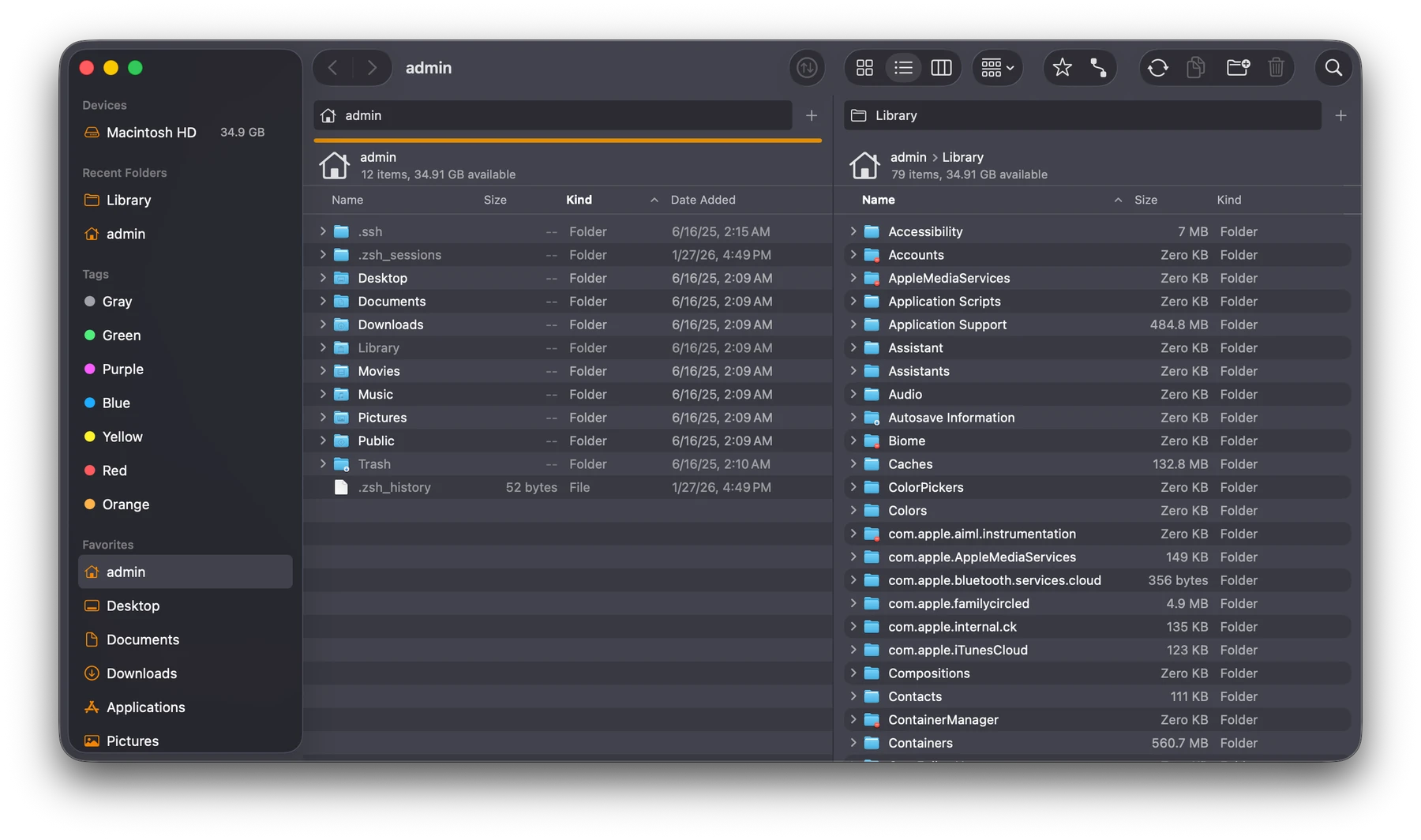
Back in Part 4, I wrote about running my Retina display at its native resolution so I could fit more windows on it. I made the text bigger inside individual apps instead of scaling up the whole screen. ForkLift's largest font was still too small for me. I asked support for a larger size, and they added it. I could finally read the file list comfortably without giving up that extra window space. Over the years I got prompt replies and fixes, too. I still have a reply from 2016, when I was trying ForkLift 3 and asked whether it would be an upgrade. It turned out they were rewriting the whole app.
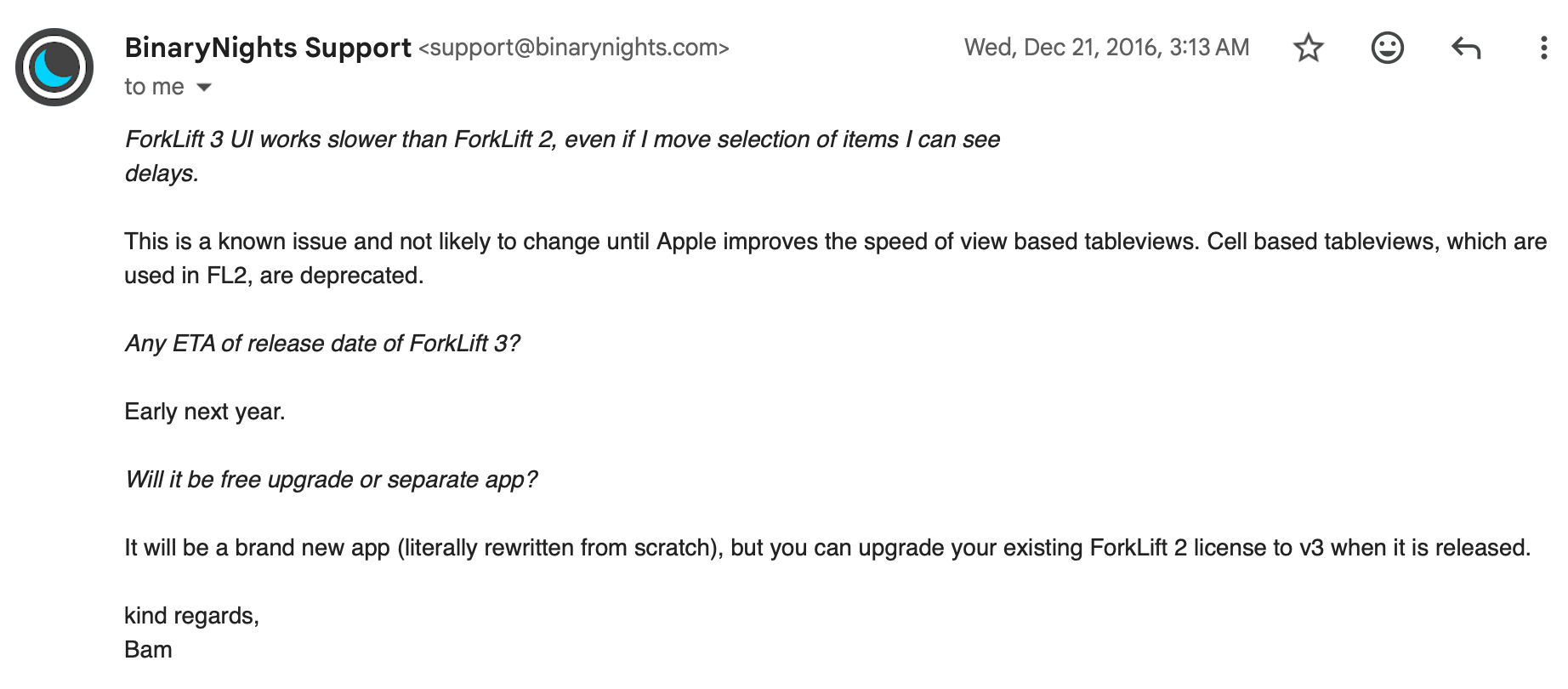
At first I opened ForkLift only for SFTP. Then I started synchronizing folders. It was like using rsync, but I could see the source in one pane and the destination in the other. On Windows I'd arranged two Explorer windows by hand to get much the same view. ForkLift was the app that finally made me like two-panel file managers. It's still maintained, and these days I use its smart bookmarks for remote locations, rename files in batches with regular expressions, and have it set to open when my Mac starts.
An Interview with Jenni from BinaryNights
Ighor July
What motivates you to continue developing and supporting ForkLift after so many years?
Jenni
This is what we do for a living, and we genuinely enjoy building ForkLift. At the same time, it’s our primary business, so it naturally takes up most of our time and energy. What keeps us motivated are the positive messages we receive from our users and the community that relies on ForkLift and looks forward to every new release.
Ighor July
What advice would you give to independent developers who hope to maintain and support their apps for ten years or longer?
Jenni
Stay passionate and don’t give up, no matter what challenges you face.
Read the complete ForkLift interview.
DaisyDisk and the Smaller SSD
My 12-inch MacBook also had a smaller SSD. In Part 3 I used Blackmagic Disk Speed Test to see how fast a drive was. On this MacBook the question I asked more often was where the space had gone. In Finder's list view I could turn on "Calculate all sizes" and sort by the Size column to see the biggest folders side by side. In Windows Explorer I'd had to open Properties for each folder. Finder was handy when I knew where to look, but less so when the big files could be anywhere on the disk.
DaisyDisk gave me a colored map of the disk. I could click a big segment, see which files and folders accounted for it, and decide whether there was anything I could remove. Sometimes the biggest folder held things I wanted to keep. It took one look to know I should spend my time somewhere else.
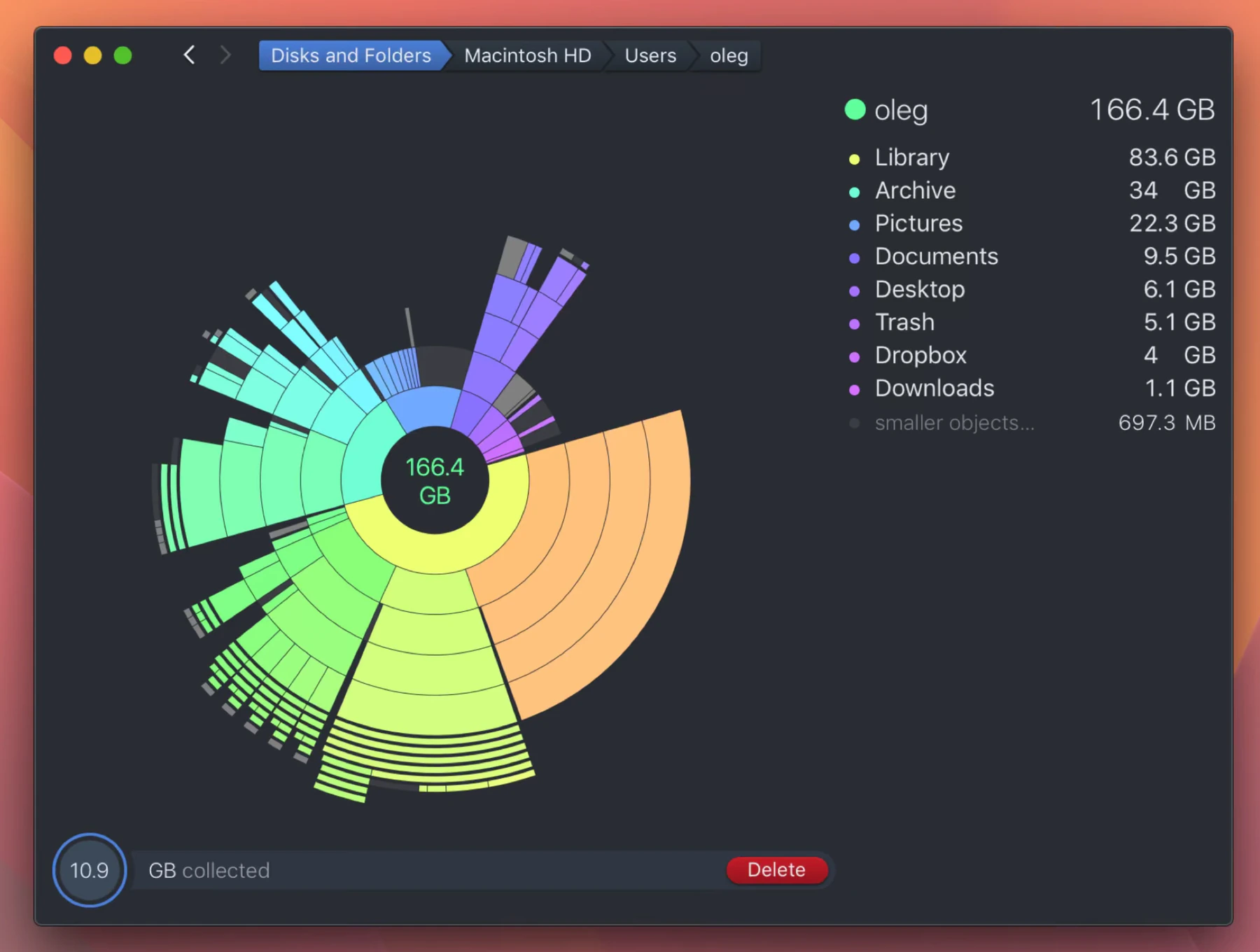
I had to do that cleanup more often than I liked, but with DaisyDisk it wasn't much of a chore. To me it set the standard for what this kind of Mac app should look like. The colors made it easier to find my way around, and the map was beautiful without making a simple job complicated. I'm glad it's still maintained. I suspect plenty of Mac users who have gone looking for missing disk space would recognize it from that screenshot alone.
An Interview with Oleg Krupnov
Ighor July
What motivates you to continue developing and supporting DaisyDisk after so many years?
Oleg Krupnov
There is still a long list of cool ideas that I would like to try and add to DaisyDisk to make the app even more useful and powerful. With each release, another version is already in development that will be faster, more efficient, and have more new features.
I am motivated by the creativity of the process, the chance to surprise our audience and exceed their expectations, and, of course, the opportunity to make money too.
Ighor July
What advice would you give to independent developers who hope to maintain and support their apps for ten years or longer?
Oleg Krupnov
I may have "survivor's bias," but I will try to answer. A product's longevity probably depends on whether there is ongoing demand for it.
Some solutions are looking for a problem. Others copy existing solutions without adding any value. Some products may be good but extremely difficult to market because they lack focus or target a niche that is too narrow. Such products will likely never take off or become sustainable.
If a product has proven to be in demand and sustainable, its creators should gradually allocate more resources to its continued evolution, staying ahead of the competition and supporting existing customers.
Read the complete DaisyDisk interview.
Viscosity and a Second Connection
I used OpenVPN to reach the servers that ran my apps. Viscosity handled those connections well. It gave me a Mac interface for managing my OpenVPN profiles, and when I only needed one connection, I had little reason to think about it.
The trouble started when I needed to reach several networks at once. Viscosity could keep those connections open, but getting the OpenVPN routes right was a pain. Even when the connections worked, running several OpenVPN processes at once drove up CPU usage on my Mac. I tried to bring it down and eventually gave up looking for a fix.
If you need to manage OpenVPN connections on a Mac, I think Viscosity may be the best graphical tool for the job. The developer is responsive and has kept the app up to date for years. It was OpenVPN I wanted to replace, not Viscosity.
WireGuard gave me what I'd been looking for. Its tunnels were easier to configure, and they used less CPU on my Mac, so I switched all my servers over. I couldn't keep several tunnels active at once with the official Mac app, so for a while I started them from Terminal instead.
What I Kept in the Menu Bar
The app that eventually saved me those trips to Terminal came into my life for an unrelated reason. On Windows and later on macOS, I'd install an app, quit it, and discover that a service it had installed without asking was still running. On my Mac I kept scripts and bookmarks to the folders where those services registered themselves. If one came back after an update, I had to go looking again.
The Login Items list on my Mac didn't show me the daemons those apps had installed. LaunchControl did. After installing an app, I could find its helper and disable it if I didn't want it starting automatically.
I installed Google Chrome and TeamViewer through Homebrew and preferred to update them there. I didn't need Chrome's updater running in the background, and I didn't want TeamViewer's privileged helper running when I wasn't using TeamViewer.
I bookmarked both jobs in QuickLaunch. If an update installed them again, I could see their status in the menu bar and unload them together with one click. I didn't have to open a folder or run a script just to find out what had changed.
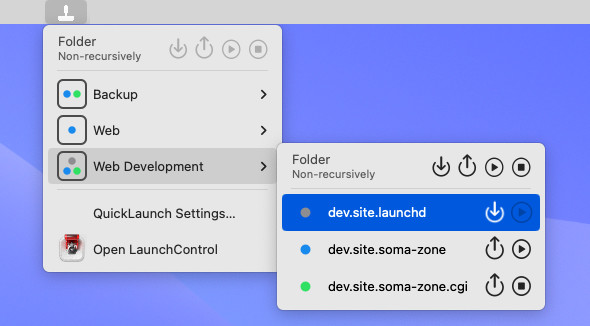
The interface improved over the next few updates. By then I had jobs I actually wanted to keep running together. Each of my WireGuard tunnels had its own Homebrew service, so I added them to the same menu. Once a tunnel was configured I could leave its settings alone, start another alongside it, and see at a glance which networks I was connected to. When I was done, I could stop them all together. LaunchControl is still my first choice for managing WireGuard on a Mac, even though it isn't a VPN client. It's still supported, too. When I found bugs and reported them, the fixes came quickly.
An Interview with Robby Pählig
Ighor July
What motivates you to continue developing and supporting LaunchControl after so many years?
Robby Pählig
There will always be room for improvement. There are features I miss which I want to add. And even though to this date I have coded more than a hundred validations into it, there are details it still misses. Also, launchd is here to stay; it keeps evolving, and LaunchControl has to learn its new quirks and features. I want it to remain the best option available.
Ighor July
What advice would you give to independent developers who hope to maintain and support their apps for ten years or longer?
Robby Pählig
I think that happy users are the key. And happy users are created by providing them with software they want to use, which reliably helps them to accomplish their goals without getting in their way.
So pay attention to detail. Make users feel that they are using real software, honed over years to be the best it can be in its domain, not a one-off app. Provide the best customer support you can. Write a good user manual. Listen to your users. I am often surprised by the creative ideas users come up with, things I would never have thought of, simply because different users have different needs. You'll have meaningful improvements to offer gratis, which every one of your customers will appreciate.
And release updates on a regular basis. Even if you have no new features, every non-trivial program contains bugs, and you should fix them whenever you find them. Your gain is threefold: You'll benefit from happy users who can focus on their task instead of filing bug reports, and everybody looking at your change logs is reassured that the software is actively maintained. You will see a bit of exposure on software review sites like MacUpdate.com.
Read the complete LaunchControl interview.
The Size I Still Miss
If I could change one thing about that 12-inch MacBook, I'd give it a faster processor and leave the body alone. It had a full-size keyboard I liked typing on, and when I was done I could close the lid and pick it up with two fingers. Years later, that's still the size and weight I wish every MacBook could be.
Comments